How the ROI calculator works
Return on investment
ROI = (End amount + income − amount invested − costs) ÷ (amount invested + costs) × 100
Annualized return
Annualized = (1 + ROI)1 ÷ years − 1
- ROI
- as a decimal, for example 0.5 for 50%
Worked example
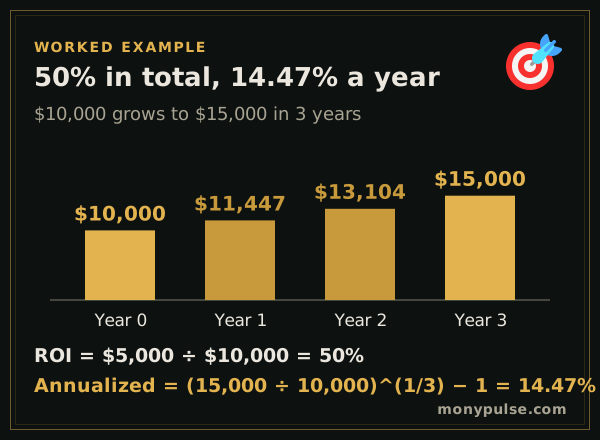
You invest $10,000.00 and three years later it is worth $15,000.00. The gain is $5,000.00, an ROI of 50%. Spread over the three years, that is an annualized return of 14.47% a year.
How do you calculate ROI?
ROI is the gain divided by what you put in. Subtract the amount invested from the final value, divide by the amount invested and multiply by 100: $10,000 that grows to $13,000 is a 30% return on investment.
ROI = (final value − amount invested) ÷ amount invested × 100
Because ROI ignores time, also look at the annualized figure: 30% earned over three years is about 9.1% a year, because (1.30)^(1/3) − 1 = 0.091. In Excel or Google Sheets, with the amount invested in A2, the final value in B2 and the years in C2: =(B2-A2)/A2 for ROI and =(B2/A2)^(1/C2)-1 for the annualized return.
Why the time held changes everything
A 50% return sounds the same whether it took one year or ten, but it isn’t. Over one year it is a 50% yearly return; over ten years it is about 4.1% a year, less than many bond funds pay. Always enter the time held so you see the annualized figure.
Compare two investments
Turn on Compare with a second investment to put two results side by side. The calculator tells you which one earned more per year held, and points out when the one with the bigger total ROI actually did worse because it took longer.
What to count in ROI
- Costs: commissions, closing costs, advisory fees and any money spent improving the asset.
- Income: dividends, interest or rent you received and kept.
- End amount: the sale price after selling costs, or today’s value if you still own it.
For a stock trade with commissions and the break-even price, use the stock profit calculator. For an investment with regular additions, use the investment calculator, and to find the rate between two amounts, use the growth mode of the interest rate calculator.
Assumptions and limits
- One amount is invested at the start and one amount is received at the end. For money added over time, the investment calculator or the S&P 500 calculator handles the timing.
- Income received along the way is counted but not reinvested.
- Taxes are not deducted unless you include them in the costs.
Frequently asked questions
How do you calculate ROI?
Subtract what you put in from what you got back, then divide by what you put in. Investing $10,000 and getting $15,000 back is a $5,000 gain, or a 50% ROI.
What is the difference between ROI and annualized return?
ROI is the total return over the whole holding period. Annualized return spreads it into an equal yearly rate. A 50% ROI over three years is about 14.5% a year; over ten years it is about 4.1% a year.
What is a good ROI?
It depends on the risk and the time. Compare the annualized return with alternatives of similar risk: a high-yield savings account, a bond fund or a broad stock index fund.
Should I include fees and taxes?
Yes, if you want your real return. Add commissions, closing costs or management fees under More options. For the tax on a sale, use the capital gains tax calculator and add the tax to the costs.
Can ROI be negative?
Yes. If you get back less than you put in, ROI is negative, and the annualized return shows the yearly rate of loss.
Sources and method
- Compound Interest Calculator · Investor.gov, U.S. Securities and Exchange Commission
- Topic no. 409, Capital gains and losses · Internal Revenue Service
Formulas and figures checked against these sources on November 12, 2026. The calculator runs entirely in your browser; nothing you type is sent to us or stored. Results are estimates for education, not financial, tax or legal advice, and MonyPulse is not a lender, tax preparer or investment adviser. Found an error? Tell us. See how we build and test our calculators and our editorial standards.