How the Break-Even Point calculator works
Break-even point in units
Units = Fixed costs ÷ (Price − Variable cost per unit)
- Price − Variable cost
- the contribution margin: what each sale adds toward fixed costs
Break-even sales
Sales = Fixed costs ÷ Contribution margin ratio
- Contribution margin ratio
- (Price − Variable cost) ÷ Price
Units for a target profit
Units = (Fixed costs + Target profit) ÷ (Price − Variable cost)
Worked example
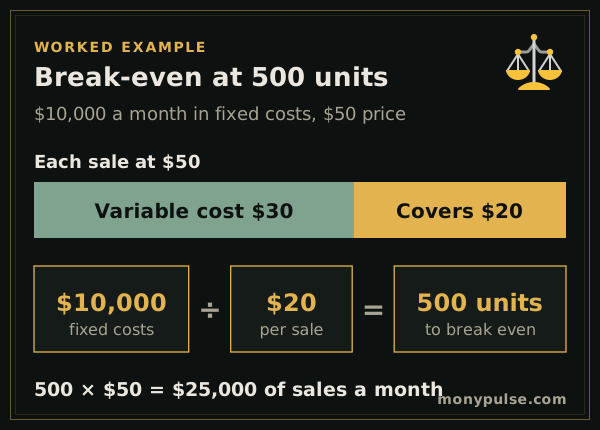
A business has $10,000 of fixed costs a month. It sells its product for $50.00, and each unit costs $30.00 to make and ship. Every sale therefore contributes $20.00 toward fixed costs, a 40% contribution margin ratio.
Dividing the fixed costs by $20.00 gives a break-even point of 500 units a month, or $25,000 in sales. At the expected 700 units, the business makes a profit, and sales could drop by 200 units before it would lose money.
How do you calculate the break-even point?
Divide your fixed costs by the contribution margin per unit, which is the price minus the variable cost of each unit. With $10,000 of fixed costs a month, a $50 price and $30 of variable cost per unit, each sale contributes $20, so you break even at 500 units, or $25,000 of sales.
- Break-even units = fixed costs ÷ (price − variable cost per unit)
- Break-even sales = fixed costs ÷ contribution margin ratio, where the ratio is (price − variable cost) ÷ price: $10,000 ÷ 40% = $25,000
In Excel or Google Sheets, with fixed costs in A2, the price in B2 and the variable cost in C2: =A2/(B2-C2) for units and =A2/((B2-C2)/B2) for sales.
Reading the break-even calculator chart
The chart plots revenue and total cost against units sold. Total cost starts at your fixed costs and rises with each unit; revenue starts at zero and rises faster. Where the lines cross is the break-even point. Everything to the right of it is profit; everything to the left is a loss.
Break-even point calculator for planning
Use the break-even point to test decisions before you make them:
- A price change: how many fewer sales can you afford after raising the price?
- A new hire or a bigger space: how many more units must you sell to cover the added fixed cost?
- A launch: choose One-time for fixed costs to see the units needed to pay back a project.
Related calculators
To price products for a target margin, use the profit margin calculator. For a full view of profit after overhead, interest and taxes, the profit calculator lays it out like an income statement, and the revenue calculator projects sales over the next 12 months.
Assumptions and limits
- One product, or an average price and variable cost across your products.
- Price and variable cost per unit stay the same at every volume, and fixed costs don't change within the period.
- The break-even point is rounded up to whole units.
Frequently asked questions
How do you calculate the break-even point?
Divide your fixed costs by the contribution margin per unit, which is the price minus the variable cost of one unit. With $10,000 of monthly fixed costs, a $50 price and a $30 variable cost, you break even at 500 units a month.
What is the difference between fixed and variable costs?
Fixed costs stay the same however much you sell, like rent, insurance and salaries. Variable costs rise with each sale, like materials, shipping, packaging and card processing fees.
How do I lower my break-even point?
Raise the price, cut the variable cost per unit or reduce fixed costs. Raising the price is often the strongest lever, because the whole increase goes to the contribution margin.
What is the margin of safety?
How far sales can fall from your expected level before you start losing money. Enter expected units under More options to see it in units and as a percentage.
Should the break-even point include my own pay?
Yes. Add the salary you need to fixed costs, otherwise the business can look like it breaks even while paying you nothing.
Sources and method
- Break-even point calculator · U.S. Small Business Administration
- Plan your business · U.S. Small Business Administration
Formulas and figures checked against these sources on November 12, 2026. The calculator runs entirely in your browser; nothing you type is sent to us or stored. Results are estimates for education, not financial, tax or legal advice, and MonyPulse is not a lender, tax preparer or investment adviser. Found an error? Tell us. See how we build and test our calculators and our editorial standards.