How the Budget calculator works
50/30/20 targets
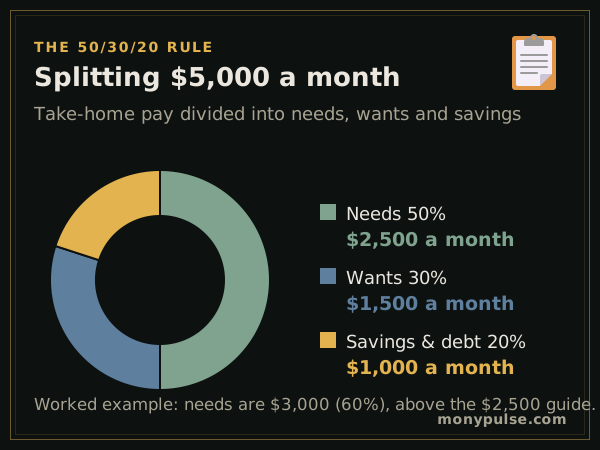
Needs = 50% of take-home pay; Wants = 30%; Savings and extra debt payments = 20%
Left over
Left over = Take-home pay − (needs + wants + savings)
Worked example
With $5,000 a month in take-home pay, the 50/30/20 rule sets targets of $2,500 for needs, $1,500 for wants and $1,000 for savings.
The example household plans $3,000 on needs, above the 50% target because rent alone is $1,600, but only $960 on wants. It saves $650, a saving rate of 13%, and has $390 left over. Moving that leftover into savings would lift the saving rate above the 20% target.
How much should you save each month?
A common benchmark is 20% of take-home pay, the savings share of the 50/30/20 budget: about $800 a month on $4,000 of take-home pay. It is a guideline, not a rule. If 20% isn’t possible yet, a smaller amount saved every month still builds the habit and can rise with each raise.
| Monthly take-home pay | Save 10% | Save 15% | Save 20% |
|---|---|---|---|
| $2,500 | $250 | $375 | $500 |
| $3,000 | $300 | $450 | $600 |
| $4,000 | $400 | $600 | $800 |
| $5,000 | $500 | $750 | $1,000 |
| $6,000 | $600 | $900 | $1,200 |
What the money is for matters as much as the amount. Common guidelines put a cash cushion of three to six months of essential expenses first (the emergency fund calculator sizes it), then retirement saving, at least enough to collect any employer 401(k) match, then other goals. To find the monthly amount for a specific goal, use the savings goal calculator.
Monthly budget calculator: needs, wants and savings
- Needs: what you must pay to live and work: housing, utilities, groceries, transportation, insurance and minimum debt payments.
- Wants: things you choose: dining out, entertainment, shopping, subscriptions, travel and gifts.
- Savings: emergency fund, retirement and investing beyond payroll deductions, and extra payments on debt.
The line between needs and wants is personal. A basic phone plan is a need; the newest phone every year is a want.
Pick a split that fits
The 50/30/20 rule is a starting point, not a law. In high-cost cities, 60/20/20 is more realistic. If you want to save aggressively, 70/20/10 keeps living costs tight and saves more than wants get. Choose the split from the menu and compare your plan with each.
Related calculators
Turn the savings share into a safety net with the emergency fund calculator, aim it at a target with the savings goal calculator, or use it to clear balances faster with the debt payoff calculator. To get your monthly take-home pay, use the paycheck calculator.
Assumptions and limits
- Take-home pay is after taxes and payroll deductions. Money already taken from your paycheck for a 401(k) isn't counted again.
- Minimum debt payments are needs; anything above the minimum counts as savings, because it improves your net worth.
- Irregular costs, such as car repairs or yearly insurance bills, should be entered as a monthly average.
Frequently asked questions
What is the 50/30/20 rule?
A simple budget split: 50% of take-home pay for needs such as housing, food and transportation, 30% for wants such as dining out and entertainment, and 20% for savings and paying down debt faster.
What if my needs are more than 50%?
That's common where housing is expensive. Try the 60/20/20 split, which keeps 20% for savings and trims wants, then look for ways to lower the biggest fixed costs over time, such as housing, car payments or insurance.
How much of my income should go to rent?
A common guideline is no more than about 30% of income. The calculator flags housing above 30% of take-home pay.
What should I do with money left over?
Give every dollar a job: add it to your emergency fund, pay down high-interest debt or invest it. Unassigned money tends to get spent.
Is the 50/30/20 rule based on gross or net income?
On take-home pay, after taxes. If your employer takes retirement contributions from your paycheck, you can count them toward the 20% savings share.
Sources and method
- Making a Budget · Federal Trade Commission, consumer.gov
- Consumer Expenditure Surveys · U.S. Bureau of Labor Statistics
Formulas and figures checked against these sources on November 12, 2026. The calculator runs entirely in your browser; nothing you type is sent to us or stored. Results are estimates for education, not financial, tax or legal advice, and MonyPulse is not a lender, tax preparer or investment adviser. Found an error? Tell us. See how we build and test our calculators and our editorial standards.