How the Profit Margin calculator works
Profit margin
Margin = (Price − Cost) ÷ Price × 100
Selling price for a target margin
Price = Cost ÷ (1 − Margin)
- Margin
- as a decimal, for example 0.40 for 40%
Markup (percentage profit on cost)
Markup = (Price − Cost) ÷ Cost × 100
Worked example
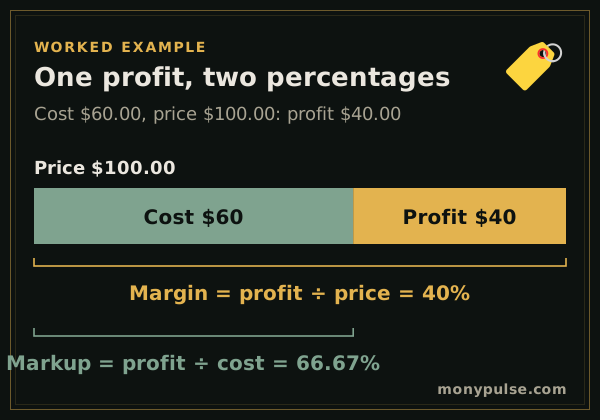
You buy a product for $60.00 and sell it for $100.00. The profit is $40.00, so the profit margin is 40% of the price. Measured against the cost instead, the same profit is a markup of 66.67%.
The table under the result lists the price you would need at common margins for the same cost, which is useful when you set prices for a new product.
How do you calculate profit margin?
Profit margin is profit divided by the selling price. Subtract the cost from the price, divide by the price and multiply by 100: a product that sells for $50 and costs $30 earns $20 of profit, a 40% margin.
Profit margin = (price − cost) ÷ price × 100
In Excel or Google Sheets, with the cost in A2 and the price in B2, =(B2-A2)/B2 formatted as a percentage gives the margin. For a whole business, use revenue and the matching costs: revenue minus the cost of goods sold gives gross margin, and revenue minus all expenses gives net margin (the profit calculator shows both).
Margin vs. markup
If you came looking for a percentage profit calculator, you probably want one of these two numbers, and they are easy to mix up.
Margin and markup describe the same profit from two angles:
- Margin is profit as a share of the selling price. It tells you how much of every sale you keep.
- Markup is profit as a share of the cost. It tells you how much to add on top of what you paid.
A margin can never reach 100%, but a markup can be any size. If you want a 40% margin and you add 40% to the cost, your margin is only 28.6%. Use the target margin mode to get the right price directly, or the markup calculator if you think in markups.
Price from a target margin
Choose Cost and target margin to find the price that delivers the margin you want. Choose Price and target margin when the market sets the price, for example a competitor’s price or a retailer’s list price, to see the most you can pay a supplier.
Gross margin is not the whole story
A healthy margin on each sale still has to pay for rent, wages, marketing and taxes. To see what is left after those, use the profit calculator, and to find how many sales cover your fixed costs, use the break-even calculator.
Assumptions and limits
- Cost is everything it takes to deliver one unit: product cost, shipping in, packaging and payment fees if you want them counted.
- This is gross margin on a single item or service. Overhead such as rent and salaries is covered in the profit calculator.
- Prices are before sales tax.
Frequently asked questions
How do you calculate profit margin?
Subtract the cost from the selling price, divide by the selling price and multiply by 100. An item that costs $60 and sells for $100 has a $40 profit and a 40% margin.
What is the difference between margin and markup?
Both use the same profit, but margin divides it by the price and markup divides it by the cost. A $60 item sold for $100 has a 40% margin and a 66.7% markup. Mixing them up is one of the most common pricing mistakes.
How do I price a product for a 50% margin?
Divide the cost by one minus the margin: a $60 cost ÷ (1 − 0.50) = $120. Adding 50% to the cost gives only $90, which is a 33% margin.
What is percentage profit?
It usually means profit as a percentage of cost, which is the same as markup. Profit as a percentage of the selling price is the margin. The calculator shows both so you can use the one you need.
What is a good profit margin?
It varies a lot by industry. Grocery stores work on thin margins and high volume, while software and services often have much higher gross margins. Compare against businesses like yours and make sure the margin covers your overhead.
Sources and method
- Beginners' Guide to Financial Statements · U.S. Securities and Exchange Commission
- Plan your business · U.S. Small Business Administration
Formulas and figures checked against these sources on November 12, 2026. The calculator runs entirely in your browser; nothing you type is sent to us or stored. Results are estimates for education, not financial, tax or legal advice, and MonyPulse is not a lender, tax preparer or investment adviser. Found an error? Tell us. See how we build and test our calculators and our editorial standards.