How the Markup calculator works
Selling price
Price = Cost × (1 + Markup)
- Markup
- as a decimal, for example 0.50 for 50%
Markup from cost and price
Markup = (Price − Cost) ÷ Cost × 100
Margin a markup gives
Margin = Markup ÷ (1 + Markup)
Worked example
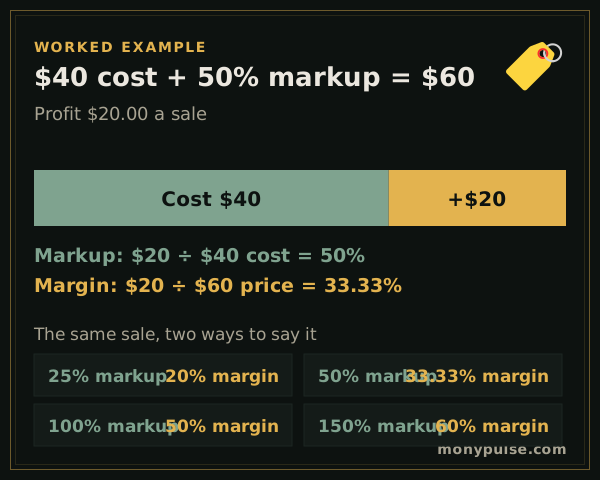
A product costs you $40.00. With a 50% markup the selling price is $60.00 and each sale brings in $20.00 of gross profit. As a share of the price, that is a gross margin of 33.33%, not 50%.
How do you calculate markup?
Markup is profit divided by cost. Subtract the cost from the price, divide by the cost and multiply by 100: an item that costs $30 and sells for $50 has a $20 markup, 66.7% of its cost. To set a price from a markup you want, multiply the cost by one plus the markup: $30 × 1.5 = $45 for a 50% markup.
Markup = (price − cost) ÷ cost × 100 · Price = cost × (1 + markup)
In Excel or Google Sheets, with the cost in A2 and the price in B2, =(B2-A2)/A2 formatted as a percentage gives the markup.
Markup and margin side by side
Markup is measured on the cost; margin is measured on the price. Because the price is always bigger than the cost when you make money, the margin percentage is always smaller than the markup percentage. The table under the results shows common markups and the margins they give:
| Markup | Margin | Price on a $10 cost |
|---|---|---|
| 10% | 9.1% | $11.00 |
| 20% | 16.7% | $12.00 |
| 25% | 20% | $12.50 |
| 33.3% | 25% | $13.33 |
| 50% | 33.3% | $15.00 |
| 75% | 42.9% | $17.50 |
| 100% | 50% | $20.00 |
| 150% | 60% | $25.00 |
| 200% | 66.7% | $30.00 |
To convert yourself: margin = markup ÷ (1 + markup), and markup = margin ÷ (1 − margin), with both written as decimals.
Keystone pricing
Doubling the cost, a 100% markup, is called keystone pricing in retail. It leaves a 50% gross margin, and that margin still has to pay for rent, wages, shipping and returns before any of it is profit.
Three ways to use the calculator
- Cost and markup: set a price using your standard markup.
- Cost and price: check the markup on a price you already charge or a supplier’s suggested retail price.
- Price and markup: find the cost you can afford when the selling price is fixed by the market.
Related calculators
If you set prices by the margin you want to keep, use the profit margin calculator. To plan sale prices, the discount calculator shows the price after a percent off, and the break-even calculator shows how many units you need to sell at your new price.
Assumptions and limits
- Cost is your full landed cost per unit: purchase price, freight in and any per-unit fees you want covered.
- Prices are before sales tax and before any discounts you give customers.
Frequently asked questions
How do you calculate markup?
Subtract the cost from the selling price and divide by the cost. An item that costs $40 and sells for $60 has a $20 markup, which is 50% of the cost.
How do I add a markup to a cost?
Multiply the cost by one plus the markup. A $40 cost with a 50% markup is $40 × 1.5 = $60.
Is a 50% markup the same as a 50% margin?
No. A 50% markup gives a 33.3% margin. To earn a 50% margin you need a 100% markup, doubling the cost, which is what retailers call keystone pricing.
What markup should I use?
Work backward from the margin you need to cover overhead and profit. If you need a 40% gross margin, the markup is 0.40 ÷ 0.60, or 66.7%.
Sources and method
- Plan your business · U.S. Small Business Administration
- Beginners' Guide to Financial Statements · U.S. Securities and Exchange Commission
Formulas and figures checked against these sources on November 12, 2026. The calculator runs entirely in your browser; nothing you type is sent to us or stored. Results are estimates for education, not financial, tax or legal advice, and MonyPulse is not a lender, tax preparer or investment adviser. Found an error? Tell us. See how we build and test our calculators and our editorial standards.